SELECT Clause
The SELECT clause determines the result set.
Prerequisites
For you to select data from a document or keyspace, you must have the query_select privilege on the document or keyspace.
For more details about user roles, see
Authorization.
Syntax
select-clause ::= SELECT [ hint-comment ] projection

Optimizer Hints
(Introduced in Couchbase Server 7.1)
In Couchbase Server 7.1 and later, you can supply hints to the optimizer within a specially-formatted hint comment. For further details, refer to Optimizer Hints.
Projection
projection ::= [ ALL | DISTINCT ]
               ( result-expr [ , result-expr ]* | ( RAW | ELEMENT | VALUE ) expr [ [ AS ] alias] ] )
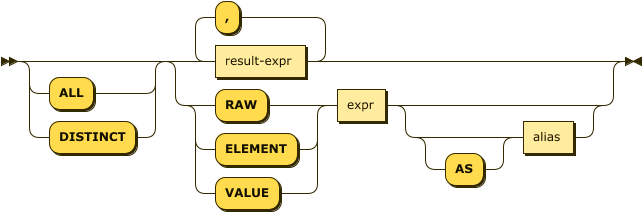
ALL / DISTINCT
(Optional; default is ALL.)
SELECT ALL retrieves all of the data specified and will result in all of the specified columns, including all duplicates.
SELECT DISTINCT removes duplicate result objects from the query’s result set.
| Since Couchbase Server 4.5.1, the DISTINCT clause is no longer blocking in nature since it streams the input and produces the output in-parallel, while consuming less memory. |
In general, SELECT ALL results in more returned documents than SELECT DISTINCT due to DISTINCT's extra step of removing duplicates.
Since DISTINCT is purely run in memory, it executes quickly, making the overhead of removing duplicates more noticeable as your recordset gets larger.
In the below table,
-
Q1's
SELECT DISTINCTreduces the recordset to a small fraction of its original size; and while removing so many of the documents takes time, projecting the remaining small fraction is actually slightly faster than the overhead of removing duplicates. -
On the other extreme, Q2's
SELECT DISTINCTdoes not reduce the recordset at all sinceMETA().idis already unique, and thus projects the entire original recordset and shows the maximum overhead of about twice as long to execute thanSELECT ALL.
| N1QL Query | SELECT ALL | SELECT DISTINCT |
|---|---|---|
Q1
|
slightly slower |
slightly faster |
Q2
|
much faster |
much slower |
DISTINCT operatorEXPLAIN SELECT DISTINCT city FROM `travel-sample`.inventory.landmark; (1)[
{
"plan": {
"#operator": "Sequence",
"~children": [
{
"#operator": "PrimaryScan3",
"bucket": "travel-sample",
"index": "def_inventory_landmark_primary",
"index_projection": {
"primary_key": true
},
"keyspace": "landmark",
"namespace": "default",
"scope": "inventory",
"using": "gsi"
},
{
"#operator": "Fetch",
"bucket": "travel-sample",
"keyspace": "landmark",
"namespace": "default",
"scope": "inventory"
},
{
"#operator": "Parallel",
"~child": {
"#operator": "Sequence",
"~children": [
{
"#operator": "InitialProject",
"distinct": true,
"result_terms": [
{
"expr": "(`landmark`.`city`)"
}
]
},
{
"#operator": "Distinct" (1)
}
]
}
},
{
"#operator": "Distinct" (1)
}
]
},
"text": "SELECT DISTINCT city FROM `travel-sample`.inventory.landmark;"
}
]| 1 | Lines using the DISTINCT operator |
Result Expression
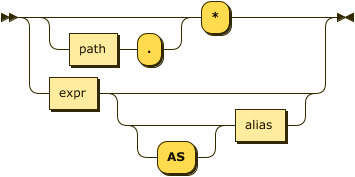
path ::= identifier [ '[' expr ']' ]* [ '.' path ]
![identifier ('[' expr ']')* ( '.' path )?](../_images/n1ql-language-reference/path.png)
One or more expressions that evaluate to one or more field names to be in the result set.
If no field name is specified, the input for the query is a single empty object that allows you to perform calculations with the SELECT statement, such as SELECT 10+20 AS Total; or other N1QL expression.
For details with examples, see N1QL Expressions.
RAW / ELEMENT / VALUE
(Optional; RAW and ELEMENT and VALUE are synonyms.)
SELECT RAW reduces the amount of data returned by eliminating the field attribute.
Query
|
Query
|
Results
|
Results
|
| 1 | Added alias |
| 2 | No added alias |
There are times in which this extra layer might not be desirable since it requires extra output parsing. So the RAW qualifier specifies that the expression that follows not to be qualified, as shown in the next example.
Query
|
Query
|
Query
|
Results
|
Results
|
Results
|
Keyspace Name
(Optional; if the keyspace is unspecified in the SELECT clause, it will be taken from the FROM clause.)
The name of the keyspace or keyspaces used, separated by a comma.
Keyspaces are equivalent to collections in Couchbase Server. A keyspace is a set of documents that may vary in structure, and is a unit of authorization and resource allocation.
|
When specifying the keyspace name in |
SELECT * FROM `travel-sample`.inventory.hotel;[
{
"hotel": { (1)
"address": "Capstone Road, ME7 3JE",
"alias": null,
"checkin": null,
...
}
}
]SELECT hotel.* FROM `travel-sample`.inventory.hotel;[
{ (2)
"address": "Capstone Road, ME7 3JE",
"alias": null,
"checkin": null,
...
}
]SELECT meta().id, email, city, phone, hotel.reviews[0].ratings
FROM `travel-sample`.inventory.hotel LIMIT 5;[
{ (3)
"city": "Medway",
"email": null,
"id": "hotel_10025",
"phone": "+44 870 770 5964",
"ratings": {
"Cleanliness": 5,
"Location": 4,
"Overall": 4,
"Rooms": 3,
"Service": 5,
"Value": 4
}
},
...
]| 1 | Added line with keyspace |
| 2 | No added line with keyspace |
| 3 | No added line with keyspace |
Field Expression
The name of the field or fields, separated by a comma, to be in the query’s result set, such as:
SELECT id, airline, stops FROM `travel-sample`.inventory.route;To use a field within an array, use [0] after the array name, followed by a period and the field name, such as:
SELECT schedule[0].day FROM `travel-sample`.inventory.route;
Best Practices
When possible, explicitly list all fields you want in your result set instead of the * to select all fields, since the * requires an extra trip over your network (one to get the list of field names and one to select the field names).
Examples
airline keyspaceSELECT * FROM `travel-sample`.inventory.airline LIMIT 1;[
{
"airline": {
"callsign": "MILE-AIR",
"country": "United States",
"iata": "Q5",
"icao": "MLA",
"id": 10,
"name": "40-Mile Air",
"type": "airline"
}
}
]landmark keyspaceSELECT * FROM `travel-sample`.inventory.landmark LIMIT 1;[
{
"landmark": {
"activity": "see",
"address": "Prince Arthur Road, ME4 4UG",
"alt": null,
"city": "Gillingham",
"content": "Adult - £6.99 for an Adult ticket that allows you to come back for further visits within a year (children's and concessionary tickets also available). Museum on military engineering and the history of the British Empire. A quite extensive collection that takes about half a day to see. Of most interest to fans of British and military history or civil engineering. The outside collection of tank mounted bridges etc can be seen for free. There is also an extensive series of themed special event weekends, admission to which is included in the cost of the annual ticket.",
"country": "United Kingdom",
"directions": null,
"email": null,
"geo": {
"accuracy": "RANGE_INTERPOLATED",
"lat": 51.39184,
"lon": 0.53616
},
"hours": "Tues - Fri 9.00am to 5.00pm, Sat - Sun 11.30am - 5.00pm",
"id": 10019,
"image": null,
"name": "Royal Engineers Museum",
"phone": "+44 1634 822839",
"price": null,
"state": null,
"title": "Gillingham (Kent)",
"tollfree": null,
"type": "landmark",
"url": "http://www.remuseum.org.uk"
}
}
]